
Layout Type
Picks the algorithm used to arrange children - the segmented button row at the top of the component.
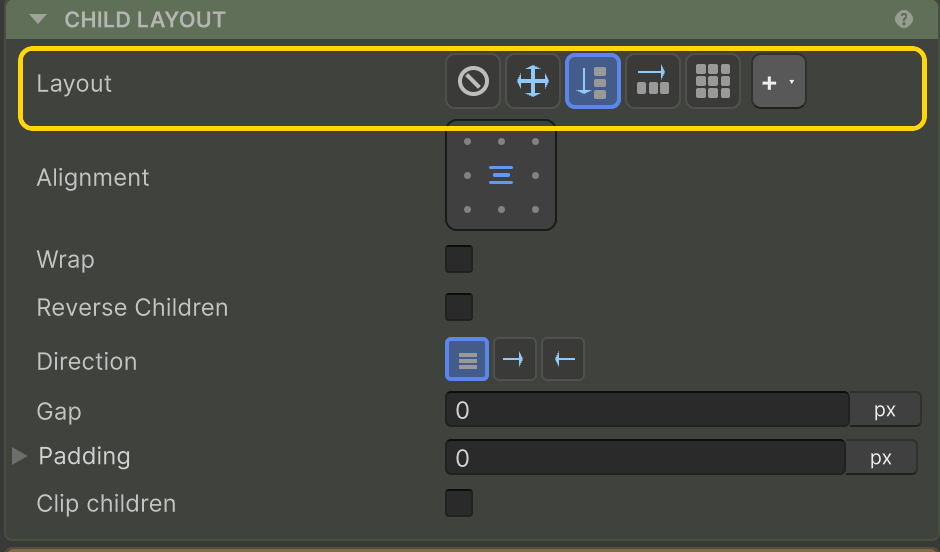
| Value | Behaviour | Full reference |
|---|---|---|
| None | This element doesn’t arrange children. Children manage their own positioning (anchors/offsets like vanilla Unity UI). | - |
| Row | Horizontal auto-layout - children flow left to right. | Row & Column |
| Column | Vertical auto-layout - children flow top to bottom. | Row & Column |
| Grid | CSS-grid-style 2D layout - explicit tracks, spans, auto-fit. | Grid |
| Absolute | Children use absolute positioning relative to this container’s content rect. Different from None: this container is itself sized normally; only the children are absolute. | Absolute |
| Custom | Pick a registered custom layout algorithm - radial, hex, anything you implement. | Custom Layouts |
The inspector shows different sub-sections depending on which Layout Type is active - Row/Column controls for Row and Column, Grid controls for Grid, a custom-settings drawer for Custom.
Related
- Row & Column - main/cross axis, alignment, wrap, distribution
- Grid - tracks, spans, auto-fit, dense flow
- Absolute - Placement modes and per-edge anchor offsets
- Custom Layouts - write your own algorithm
- Padding · Clipping - independent of Layout Type